CowSync Guide › Herd health & breeding
ET / IVF flush records
Record donor flushes and OPU-IVF sessions with IETS grades, then track recipients, synchrony and results.
ET / IVF Flush Records covers the whole embryo program. It has two tabs. Flushes / OPU records each donor session and grades the embryos. Recipients & transfers follows each embryo into a recip and through to a result. Open it from the ET / IVF flush records tile on the Workspace home.
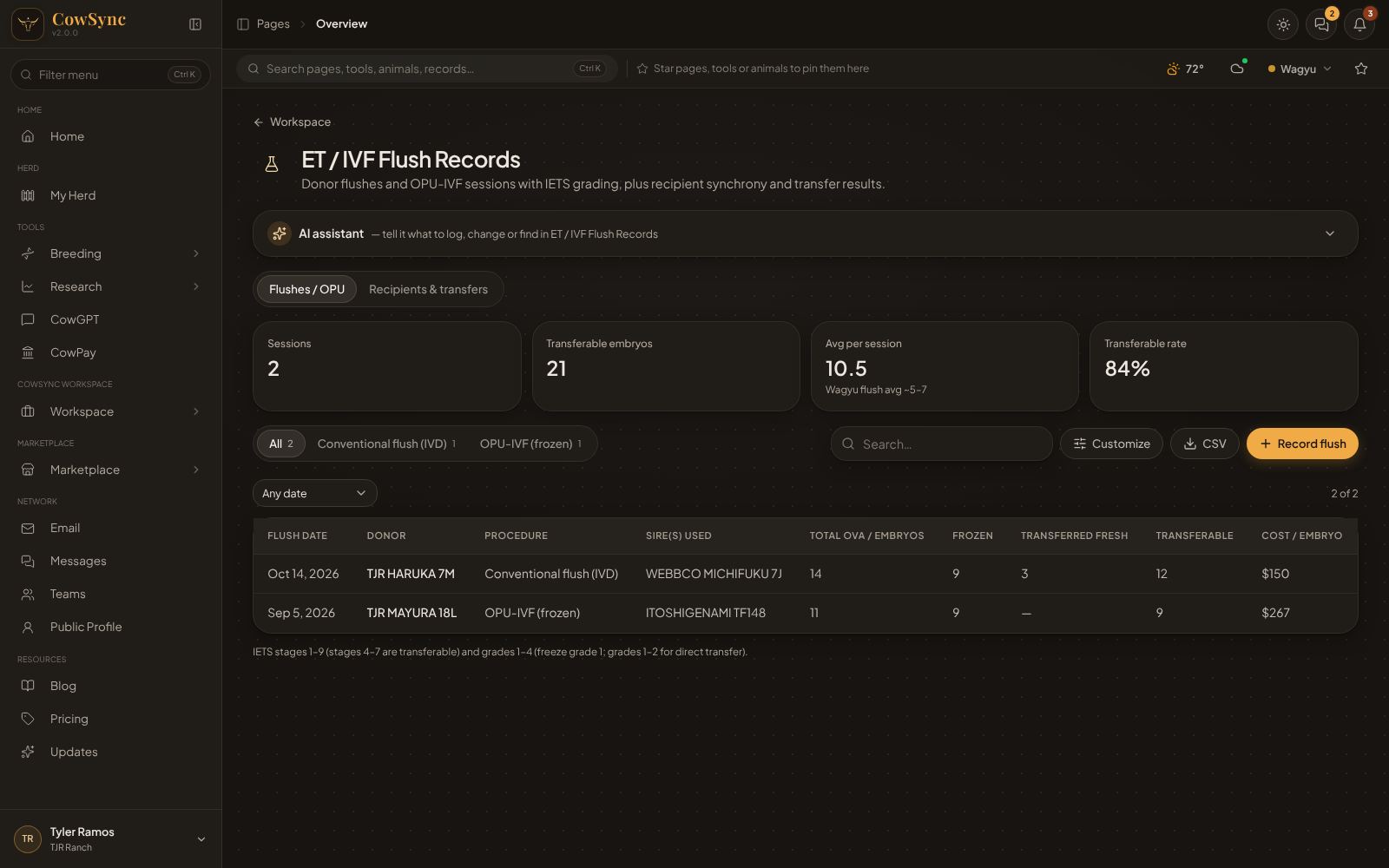
It uses the standard layout (see How record tools work).
Flushes / OPU
Record a flush
- Click Record flush.
- Fill in Flush date and Donor.
- Pick the Procedure: Conventional flush (IVD), OPU-IVF (fresh), OPU-IVF (frozen) or Sexed IVF.
- Add the Sire(s) used and the FSH product / dose (e.g. Folltropin-V 300 mg).
- Enter the counts: Total ova / embryos, Grade 1, Grade 2, Grade 3, Degenerate (G4) and Unfertilized.
- Enter where they went: Frozen and Transferred fresh.
- Add the Vet / embryologist, Facility, Cost and Notes, then click Save.
Table and cards
Columns: Flush date, Donor, Procedure, Sire(s) used, Total ova / embryos, Frozen, Transferred fresh, Transferable (grades 1 + 2 + 3, worked out) and Cost / embryo (cost ÷ transferable). The tabs are by procedure, and there's a date filter.
The cards show Sessions, Transferable embryos, Avg per session (a Wagyu flush averages about 5–7) and Transferable rate.
Right-click shortcuts
- Plan transfer day (+7 d): opens a calendar task for 7 days after the flush, ready to save.
- Add N frozen embryos to the tank…: opens a tank entry filled in as "donor × sire" with the frozen count.
Recipients & transfers
Add a transfer
- Click the Recipients & transfers tab, then Add transfer.
- Fill in the Recipient ID and the Recipient type (Angus / Angus-X heifer, Commercial cow, Holstein / Jersey, Wagyu F1, Purchased recip).
- Enter the Recipient heat (D0) and the Transfer date.
- Enter the Embryo (donor × sire) (required), the Embryo grade / stage and Fresh / frozen (Fresh, Frozen (DT), Frozen (glycerol), Vitrified).
- Record the CL side, CL quality (Good, Fair, Poor, None (reject)), BCS and Technician.
- Leave Result on Pending for now. Fill in Lease / ownership and Notes if needed, then click Save.
After the preg check, click the row and set Result to Pregnant, Open, Embryo lost or Not transferred. Add the Fetal sex if known.
Table and cards
Columns: Transfer date, Recipient ID, Embryo, Fresh / frozen, CL quality, Result (amber Pending, green Pregnant, red Open/Embryo lost), Synchrony ("Day 7" = days from recip heat to transfer) and Due (for pregnant recips, transfer date + 278 days). The tabs are by result. The filters are Any recipient type, Any fresh / frozen, Any CL side, Any CL quality and Any date.
The cards show Transfers, Pregnant, Conception (target 55–65% fresh) and Awaiting check (still Pending).
Tips
- Ask the AI assistant "What was my average embryos per flush?" or "Record a flush from donor 88 with 9 grade-1 embryos".
- Sort by Cost / embryo to compare donors.
- Use Customize to add your own recipient types or procedures to the pick lists.