CowSync Guide › Operations
Feed & hay inventory
Track bales, tons and bags on hand, with tonnage, cost per ton of dry matter, days of feed left and low-stock warnings.
Feed & Hay Inventory shows what feed you have, what it is worth, and how long it will last.
To open it, go to Workspace and click the Feed & hay inventory tile. It works like the other Workspace record lists (see Records basics).
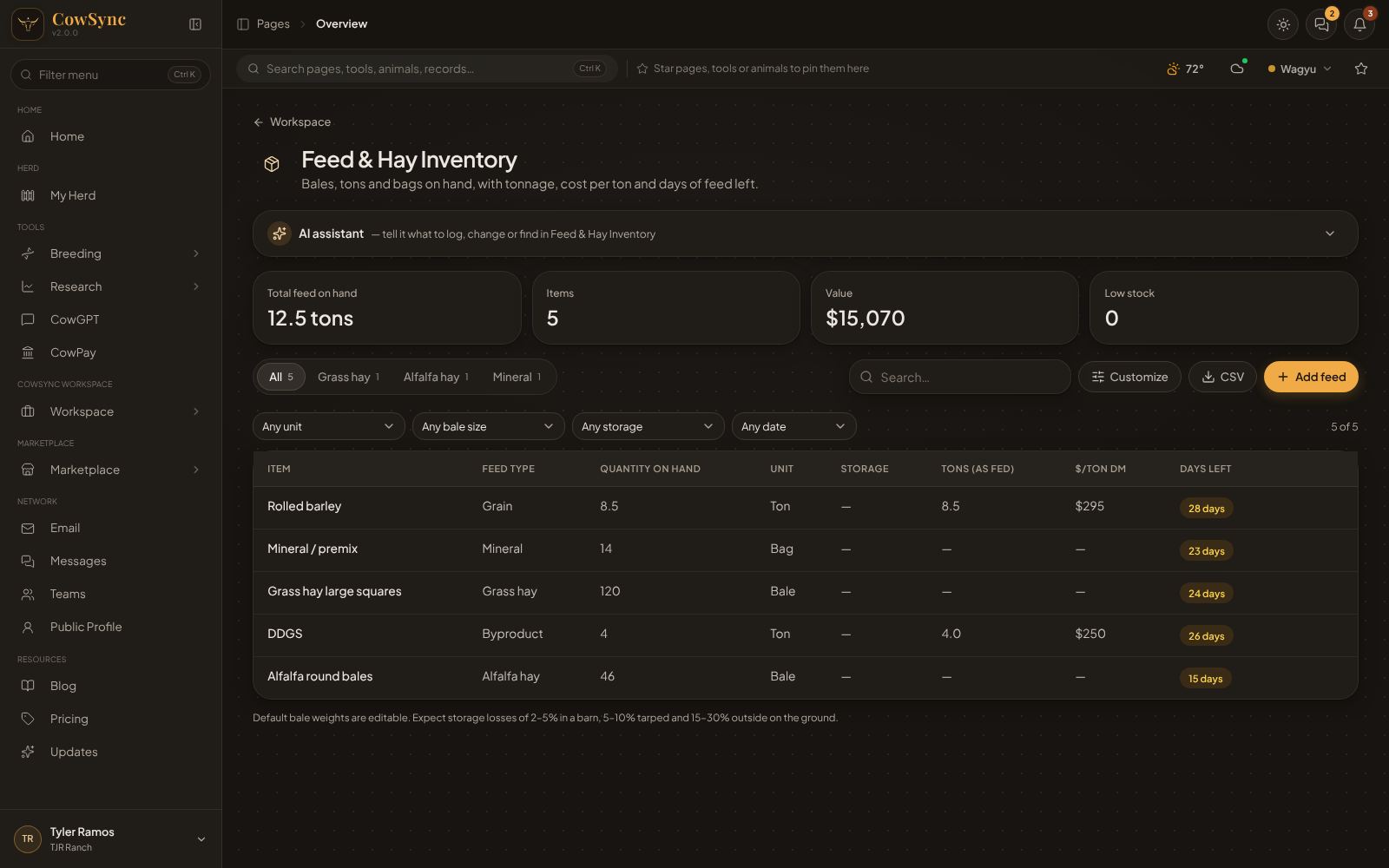
What's on the screen
- The AI assistant bar. Try "Add 40 round bales of alfalfa at $85 each" or "How many days of hay do I have left?"
- Four boxes: Total feed on hand (tons), Items, Value (cost × quantity) and Low stock (red when any item is at or below its reorder point).
- Tabs by feed type (All, Grass hay, Alfalfa hay, Mineral…), Search…, Customize (change lists, add fields, pick columns), CSV (download a spreadsheet file) and Add feed.
- Filter boxes: Any unit, Any bale size, Any storage and Any date. Clear filters resets them.
Columns
| Column | What it shows |
|---|---|
| Item, Feed type, Quantity on hand, Unit, Storage | What you typed in. |
| Tons (as fed) | Quantity × weight per unit ÷ 2,000. |
| $/ton DM | Cost per ton of dry matter, so you can compare a cheap wet feed with a pricier dry one fairly. |
| Days left | Quantity ÷ daily herd use. Red under 14 days, amber under 45, green beyond. |
The tons and $/ton columns need a weight per unit. CowSync knows the weight for tons, tonnes, lb, kg, bushels, 50 lb bags, and the common bale sizes (small square 2-string 55 lb up to round 6×6 at 1,600 lb, and wrapped baleage at 1,500 lb). For anything else, enter Weight per unit (override).
Add feed, step by step
- Click Add feed.
- Item (e.g. "2nd cutting alfalfa rounds") and Feed type: Grass hay, Alfalfa hay, Mixed hay, Straw, Rice straw, Silage, Haylage / baleage, Corn, Barley, Oats, DDGS, Soybean hulls, Whole cottonseed, Protein supplement, Mineral, Lick tub / block, Creep / pellets, Commodity mix.
- Quantity on hand (required) and Unit: Bale, Ton, Tonne, lb, kg, Bushel, Bag (50 lb), Tub, Tote, Load.
- For bales, pick the Bale size.
- Feed test numbers if you have them: Dry matter % (starts at 88), Crude protein %, TDN %.
- Lot / cutting, Supplier, Purchase date, Cost per unit and Storage (Barn, Tarped, Outside on ground, Bin / silo, Bunker).
- Daily herd use (units per day) to get Days left, and Reorder at to get low-stock warnings.
- Click Save.
As you feed out, click the row, lower Quantity on hand and click Save.
Right-click a feed row
Edit, Duplicate, Copy as text, Reorder (adds a "Reorder …" task for tomorrow in the Feeding calendar, with the supplier in the notes), Add to calendar…, Log $… as expense…, Save to a note, Add to ideas board… and Delete.
How it connects
- The Finance & expenses dashboard counts each row as a Feed cost of cost per unit × quantity on hand. So when you lower the quantity as you feed out, that cost goes down too. To keep the full purchase in your books, also log it in the ledger (right-click the row and choose Log $… as expense…) and switch Feed & hay off under Map expenses on the Finance page.
- The Hay & winter feed needs calculator in Ranch calculators tells you how many bales you need. Right-click its result to add the shortfall here.
- The Feed ration balancer calculator works out protein, energy and cost per head per day.
- Customize lets you change any drop-down list and add your own fields, such as "Barn bay #".