CowSync Guide › Documents & records
Movement & transport
Log every load in and out with premises IDs, CVIs, brand inspections, EIDs and NVD / NLIS, and keep an eye on time in transit.
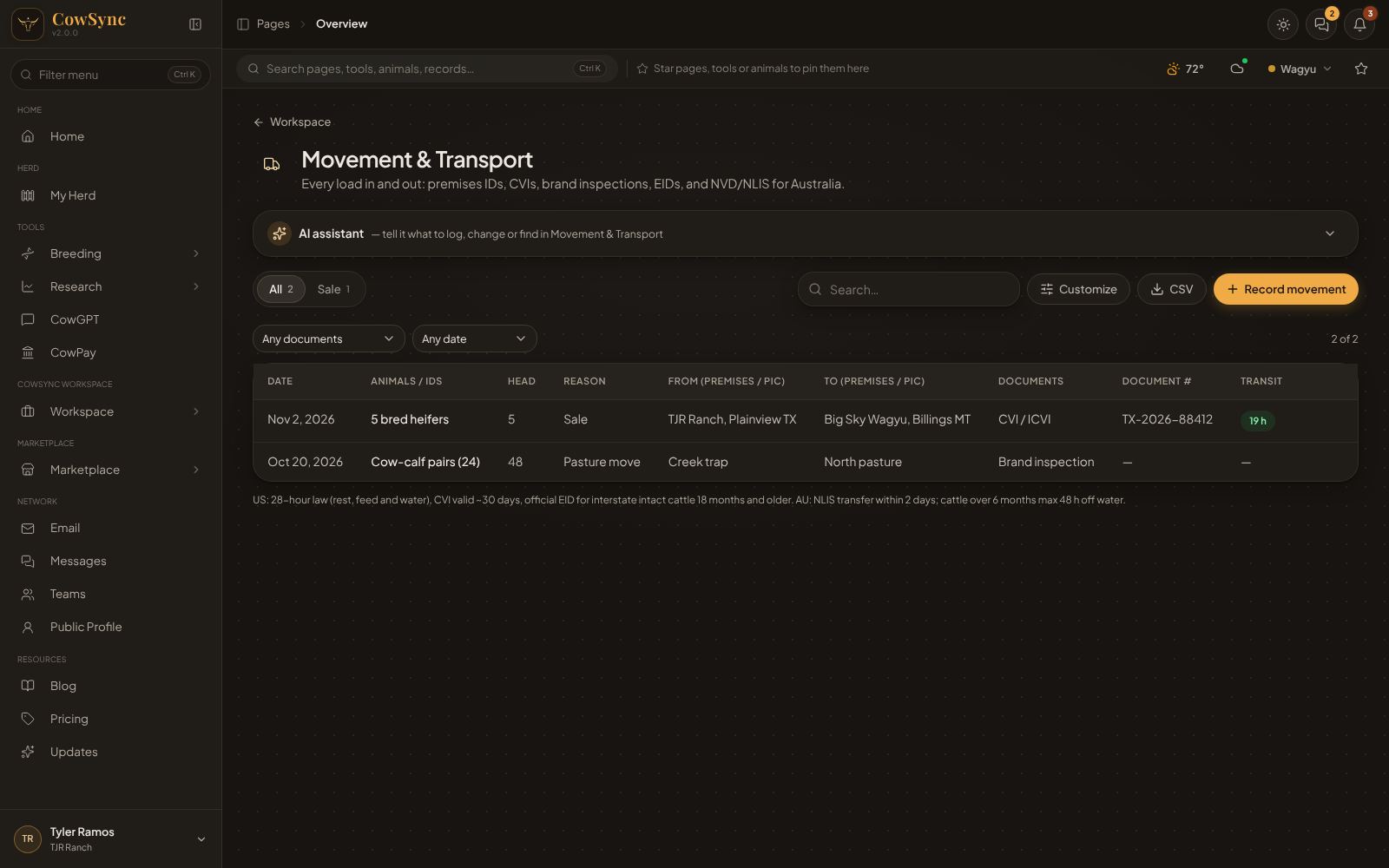
Movement & Transport is your trucking log. Every load in or out is one record: which animals, where from and to, why, which papers went with them and who hauled them. It covers US paperwork (CVIs, brand inspections, official EID), Australian paperwork (NVD, NLIS, PIC) and NAIT for New Zealand. To open it, click the Movement & transport tile on the Workspace page.
Record a movement
- Click Record movement.
- Fill in Date, Animals / IDs (required), Head and Reason (required).
- Add From (premises / PIC) and To (premises / PIC).
- Choose the Documents that went with the load, and the Document #.
- Add Transporter, Vehicle / rego, Departure and Arrival times, Hours in transit, Vet / inspector and any Notes.
- Save.
Selling lots in the Sale & auction planner? Right-click a lot and choose Book transport for this lot… to start a movement with the animal already filled in.
Reasons
Sale, Purchase, Agistment / lease out, Return from lease, To feedlot, To processor, Breeding (bull / ET center), Show / exhibition, Veterinary care, Pasture rotation, Export, Death / disposal.
Documents
CVI / ICVI, Brand inspection, Owner-shipper statement, Official EID (840), Trich certificate, Bill of sale, Entry permit, Export health certificate, NVD (LPA), NLIS transfer, Waybill, NAIT movement.
If you use different wording, change either list under Customize.
Columns
Date, Animals / IDs, Head, Reason, From, To, Documents, Document # and Transit. Transit shows the hours in green. Over 28 hours it turns red and reads “rest stop needed”. Click a column heading to sort by it. Click again to reverse the order, and a third time to go back to normal.
Find a load
- Tabs: All, plus one tab for each reason you have used (Sale, Pasture rotation…), with counts.
- Filter boxes: Any documents and a date box (Any date, Last 7 days, Last 30 days, Last 90 days, This year). Clear filters resets them. The count on the right, such as “2 of 2”, shows how many rows match.
- Search… looks through every field.
Before your first load, the list reads No movements yet.
Customize, export and the row menu
- Customize lets you edit the choice lists, add your own boxes (such as “Load #” or “Seal number”) and pick which columns show.
- CSV downloads the rows you are looking at as a spreadsheet file that opens in Excel or Google Sheets, handy for your state vet.
- Right-click a row for Edit, Duplicate, Copy as text, Record movement, Add to calendar… (or Remind me on …), Log as expense…, Save to a note, Add to ideas board… and Delete.
Records basics explains these shared buttons in full.